Is Squarespace Good for Ecommerce? My thoughts on how it compares vs Shopify
 By David Nge | Last Updated: March 05, 2026
My work is supported by affiliate commissions. Learn More
By David Nge | Last Updated: March 05, 2026
My work is supported by affiliate commissions. Learn More
Squarespace has earned its reputation as the design-forward website builder.
But when it comes to actually selling products online, are they any good? Can it handle ecommerce? What selling features are at your disposal, how much do they cost, and do people even use them?
I've spent extensive time testing Squarespace's ecommerce features against what small sellers actually need. As in creators, service providers, and small business owners selling dozens to a few hundred products.
People who care about how their store looks and how smoothly it runs.
Here's what I found about where Squarespace ecommerce delivers, where it falls short, and who it's actually built for.
Squarespace ecommerce fits specific business profiles well, and fits others poorly. Knowing which camp you fall into saves you months of frustration.
Here's a quick decision matrix:
| Business Type | Squarespace Fit | Better Alternative |
|---|---|---|
| Boutique shop (<500 products) | Great | — |
| Creative portfolio + shop | Great | — |
| Service provider + shop | Great | — |
| Blogger/creator adding merch | Good | — |
| Digital-only products | Okay (watch the fees) | Gumroad and alternatives, Shopify |
| Subscription business | Poor | Shopify, WooCommerce |
| Large catalog (1,000+ SKUs) | Poor | Shopify |
| International seller | Poor | Shopify |
| Dropshipping | Poor | Shopify |
Squarespace overhauled its pricing in May 2025, replacing the old Personal/Business/Commerce Basic/Commerce Advanced structure with four new tiers. Here's what each plan costs and what it means for your store.
| Basic ($16/mo) | Core ($23/mo) | Plus ($39/mo) | Advanced ($99/mo) | |
|---|---|---|---|---|
| Monthly billing price | ~$25/mo | ~$36/mo | ~$56/mo | ~$139/mo |
| Product transaction fee | 2% | 0% | 0% | 0% |
| Digital product fee | 7% | 5% | 1% | 0% |
| Payment processing | 2.9% + $0.30 | 2.9% + $0.30 | 2.7% + $0.30 | 2.5% + $0.30 |
| Abandoned cart recovery | No | No | Yes | Yes |
| Gift cards | No | No | No | Yes |
| Subscriptions | No | No | No | Yes |
| Custom CSS/code | No | Yes | Yes | Yes |
Prices shown are billed annually. Annual billing saves 28-36% depending on the plan.
The plan most people should pick: Core at $23/mo. It removes the 2% product transaction fee, unlocks custom code injection, and gives you a fully functional store.
The $7/mo jump from Basic can be easily recouped if you sell just $350/mo in products, the 2% fee on Basic already costs you $7.
This is the pricing detail buried in Squarespace's fine print that catches digital sellers off guard. On top of payment processing fees, Squarespace charges a separate platform fee on digital product sales:
For a digital seller doing $2,000/mo in revenue, the difference between Basic (7%) and Advanced (0%) is $140/mo in platform fees alone. At that volume, the Advanced plan at $99/mo pays for itself compared to Basic at $16/mo + $140 in fees.
If digital products are your primary revenue, do this math before choosing a plan. For most digital sellers, either Plus ($39/mo with just 1% fee) or Advanced ($99/mo with 0%) makes more financial sense than the cheaper plans.
Every sale incurs payment processing fees regardless of your plan. Using Squarespace Payments (their native processor):
| Plan | Domestic Cards | American Express |
|---|---|---|
| Basic / Core | 2.9% + $0.30 | 3.2% + $0.30 |
| Plus | 2.7% + $0.30 | 3.2% + $0.30 |
| Advanced | 2.5% + $0.30 | 3.2% + $0.30 |
These rates are competitive with Shopify Payments (2.9% + $0.30 on Basic Shopify). The difference between plans is small (0.2-0.4%) and only matters at high volume. On $10,000/mo in sales, the difference between Core (2.9%) and Advanced (2.5%) saves about $40/mo.
One thing worth noting: if you issue a refund, Squarespace refunds the transaction fees back to you. Shopify doesn't.
The sticker price comparison ($23/mo vs $29/mo) dramatically understates how much cheaper Squarespace is for small stores. Here's what a typical small store pays on each platform:
| Cost Item | Squarespace Core | Shopify Basic |
|---|---|---|
| Platform | $23/mo | $29/mo |
| Theme/template | $0 (all free) | $0-400 (one-time, many premium themes cost $150-400) |
| Product reviews app | Included | $0-15/mo (Loox, Judge.me) |
| Email marketing | Included (basic) | $0-20/mo (Klaviyo, Mailchimp) |
| SEO tools | Included | $0-40/mo (Plug in SEO, SEO Manager) |
| Popup/banner tools | Included | $0-20/mo (Privy, Justuno) |
| Typical monthly total | $23/mo | $49-124/mo |
Squarespace includes email campaigns, product reviews, popup tools, and SEO features natively. On Shopify, each of these is a separate app with its own subscription.
A Shopify store with 3-4 common apps easily costs $50-80/mo more than the base plan suggests.
This cost advantage evaporates for larger stores where Shopify's app ecosystem and scalability justify the higher spend. But for a small store selling under $5,000/mo, Squarespace is often $300-900/year cheaper all-in.
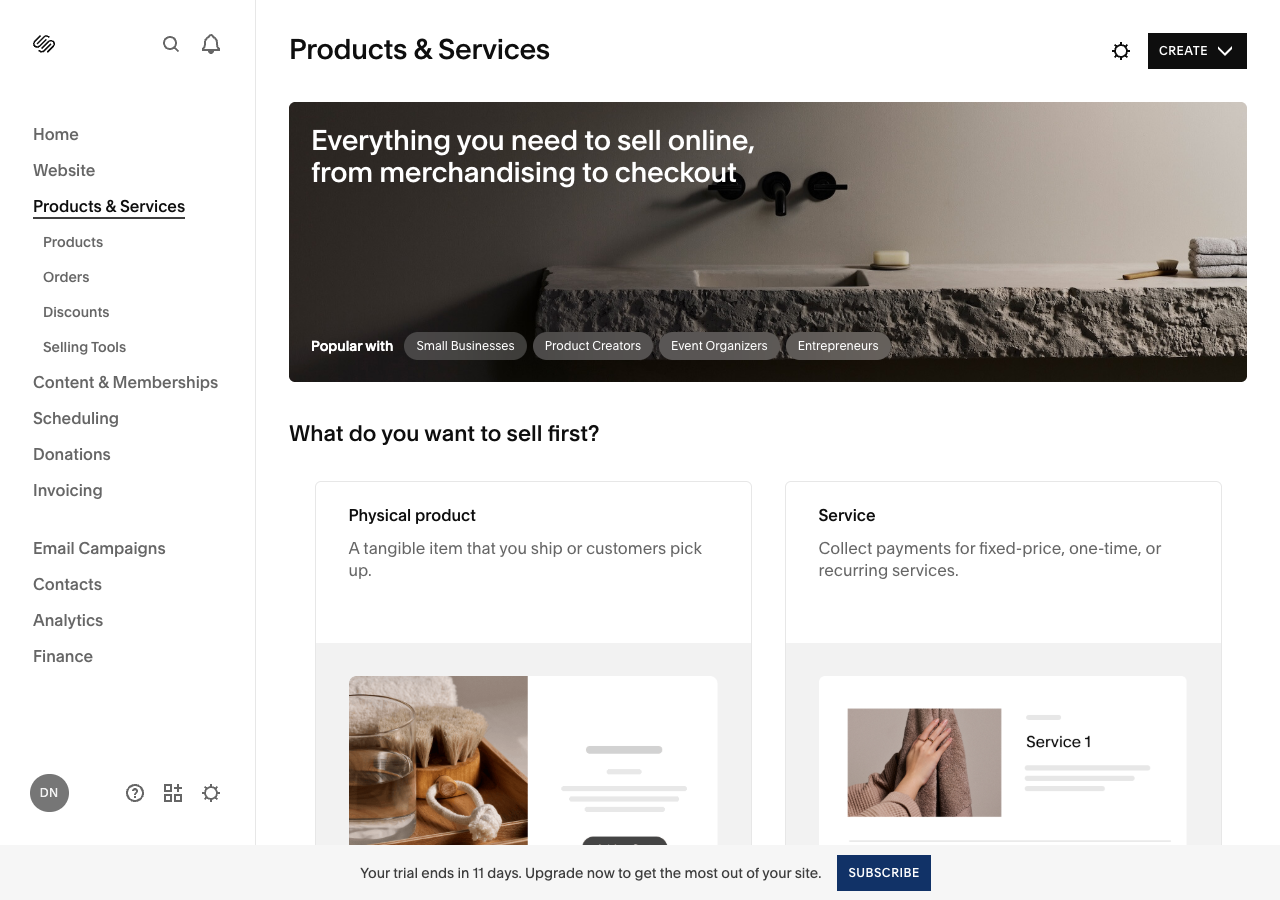
Squarespace supports more product types than most people expect. Here's what's available and what to watch out for with each.
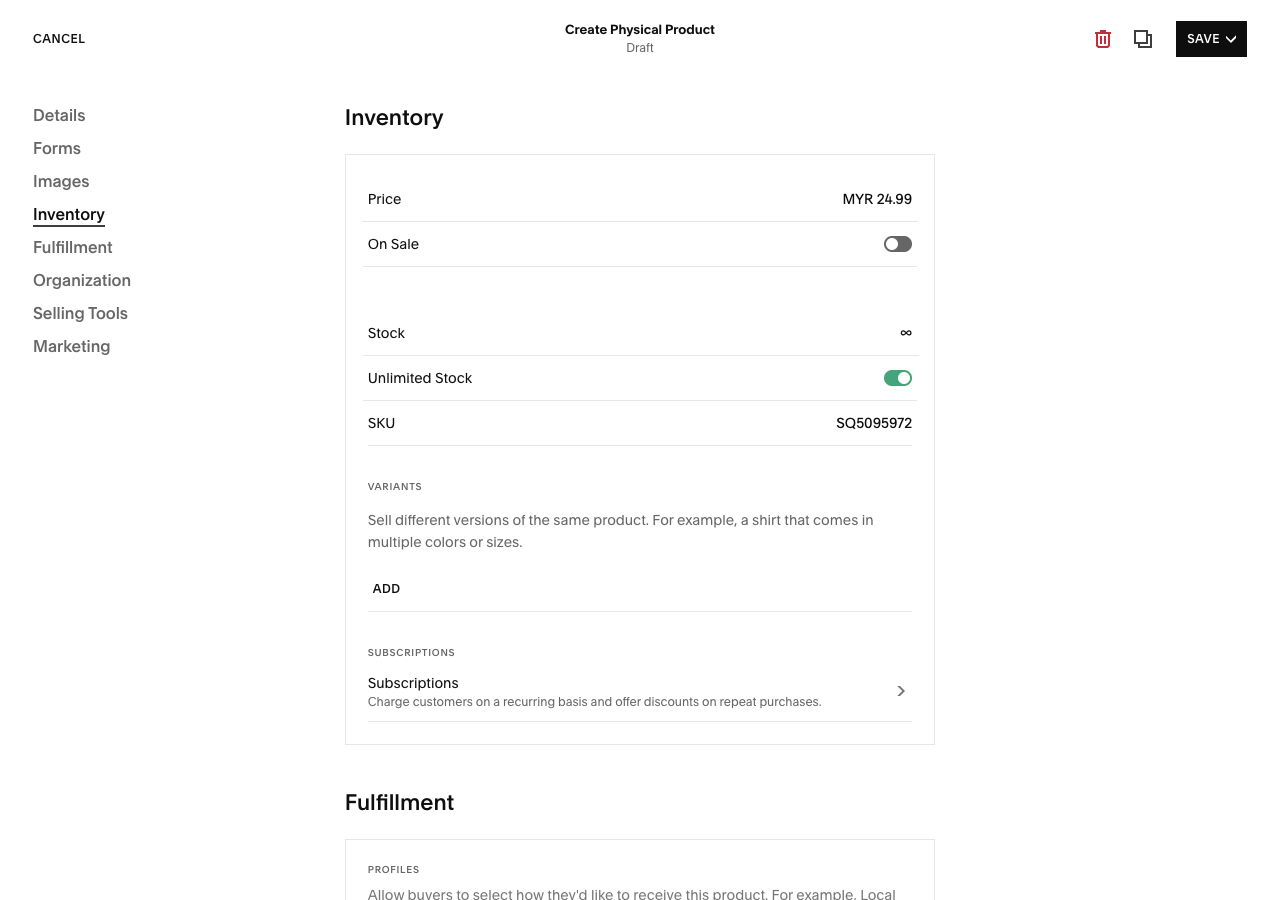
The core of Squarespace ecommerce. You can list unlimited physical products with up to 250 variants per product (size, color, material combinations) and 6 product options per item. Each product supports multiple images, detailed descriptions, product reviews, and waitlists for out-of-stock items.
Inventory tracking works through the Squarespace mobile app, which also supports barcode scanning for printing shipping labels. For product-based businesses, the workflow is straightforward: add products, set prices and shipping, and manage orders from the dashboard.
Squarespace handles digital downloads — ebooks, music, templates, presets, printables — with some important caveats:
For creators selling small digital files (PDF guides, photo presets, design templates), Squarespace works fine. For anyone selling large files or high-volume digital products, the fees and file size limits are significant drawbacks compared to dedicated platforms like Gumroad or Shopify's digital delivery.
This is where Squarespace has an edge most ecommerce platforms don't: Acuity Scheduling is built in.
You can sell service appointments like consultations, coaching sessions, classes, workshops directly from your site with:
For service providers who also sell products (a yoga instructor selling classes and branded merchandise, for example), having both in one platform eliminates the need to juggle Calendly + Shopify + a separate website. You can see how real businesses use Acuity Scheduling on Squarespace for reference.
Squarespace supports subscription products — monthly coffee deliveries, quarterly subscription boxes, recurring digital access — but only on the Advanced plan ($99/mo). And the limitations are significant enough to flag:
For businesses where subscriptions are a secondary offering (a coffee roaster selling bags with an optional monthly subscription), these limitations are manageable. For a business built around subscriptions, they're deal-breakers. Shopify handles subscriptions much more flexibly through apps like Recharge or Loop.
Gift cards are available on the Advanced plan only ($99/mo). Member areas let you sell access to gated content: paid newsletters, exclusive video libraries, and online courses on any commerce plan.
Courses can be structured with modules and lessons, making Squarespace a viable option for course creators who also want a polished website.
This is Squarespace's strongest selling point. Every template is free (Shopify charges $150-400 for premium themes), and the design quality is a level above most competitors. There are 180+ templates, and while all of them can technically be used for ecommerce, the ones in the "Online Store" category are optimized with product grids, cart pages, and category navigation.
Key design features:

The limitation: you're working within Squarespace's design system. Custom CSS is available on Core plans and above, but you can't modify the checkout page at all. If pixel-perfect checkout customization matters to you, Squarespace isn't the right fit.
Squarespace supports four payment processors:
Buy Now Pay Later options include Afterpay, Clearpay, and Klarna (requires Squarespace Payments or Stripe). Apple Pay and Google Pay are supported for faster mobile checkout.
For comparison, Shopify connects to 100+ payment gateways. If your customers need payment methods beyond these four processors, Squarespace can't accommodate that. For most small US or UK-based stores, though, Stripe + PayPal + Apple Pay covers the vast majority of customers.
Squarespace offers several shipping options:
This covers most small store needs. What's missing compared to Shopify: no direct integration with third-party fulfillment services (3PLs), no multi-warehouse inventory management, and carrier-calculated rates are limited to three carriers.
Squarespace bundles marketing tools that Shopify charges extra for:
The SEO tools cover the basics: you can edit SEO titles and descriptions per product page, and Squarespace auto-generates product schema markup (structured data for Google).
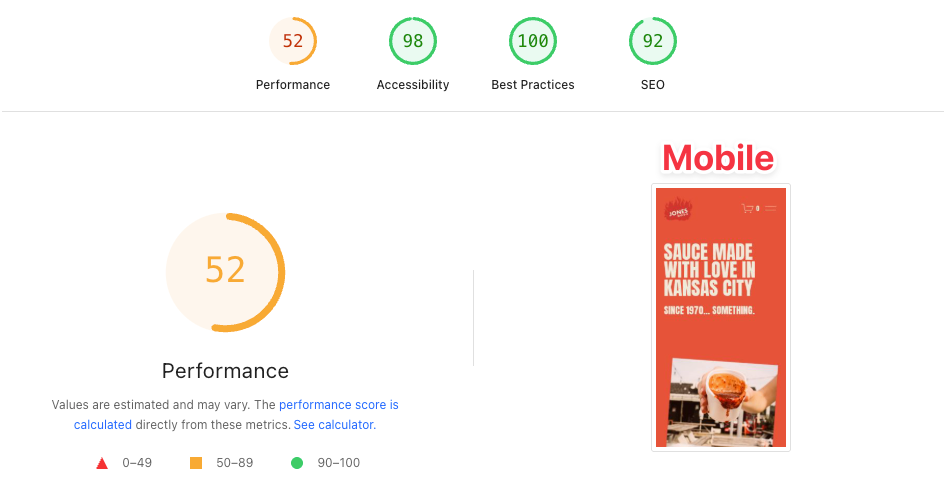
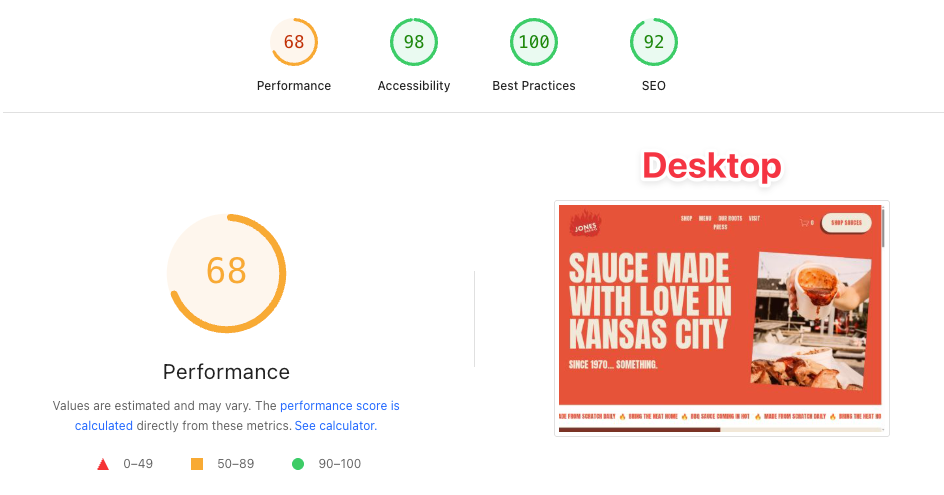
But PageSpeed scores are a weak point.
Testing shows 52/100 on mobile and 68/100 on desktop, which is mediocre. Squarespace's design-heavy templates come at a performance cost.
Product management on Squarespace is adequate for small catalogs:
What's missing: no bulk editing tools for large catalogs, no tiered or quantity-based pricing, no product bundling, and no integration with external inventory management systems. If you're managing 500+ SKUs with complex variant combinations, you'll feel the limitations.
Every platform has trade-offs. Here are Squarespace's most significant ones, organized by how likely they are to affect you.
This is one of Squarespace's weaknesses for growing businesses:
If your customers are primarily in one country (especially the US or UK), these limitations won't affect you. If you're selling to customers across multiple currencies and countries, Shopify handles international commerce far better.
Four payment processors vs Shopify's 100+. For most small US stores this is fine, Stripe, PayPal, and Apple Pay cover the majority of customers. But you can't accept:
Squarespace has 47 extensions in its marketplace. Shopify has over 16,000 apps. Wix has 1,800+.
This means if Squarespace doesn't natively support a feature, you likely can't add it. No advanced loyalty programs, no sophisticated upsell funnels, no integration with most third-party tools. Multi-channel selling (Amazon, eBay, Google Shopping) requires third-party add-ons costing $24-35/mo.
The flip side: Squarespace's native features cover more ground than Shopify's base platform. You need fewer extensions because more is built in. But when you need something Squarespace doesn't have, there's often no workaround.
Squarespace works well under approximately 500-1,000 products. Beyond that:
Squarespace stores are boutique by nature. 76.8% of live Squarespace stores are US-based, and the most successful examples tend to be small, curated catalogs with strong branding. If your growth plan involves scaling to thousands of products or international markets, start on Shopify to avoid a painful migration later.
This is the comparison most readers need. Here's how they stack up across the factors that matter most.
| Factor | Squarespace | Shopify |
|---|---|---|
| Starting price (annual) | $16/mo (Basic) | $29/mo (Basic) |
| Recommended plan for stores | $23/mo (Core) | $29/mo (Basic) |
| Transaction fees | 0% on Core+ | 0.5-2% unless using Shopify Payments |
| Payment gateways | 4 | 100+ |
| Apps/extensions | 47 | 16,000+ |
| Product variants | 250 | 100 (2,000 on Shopify Plus) |
| Multi-currency | No | Yes (with Shopify Payments) |
| POS | US only | Global |
| Templates | 180+ (all free) | 200+ (many premium, $150-400) |
| Dropshipping | Limited | Extensive |
| Design quality | Superior | Good (improving) |
| Blogging | Excellent | Basic |
| Built-in email marketing | Yes | No (app required) |
| Built-in scheduling/booking | Yes (Acuity) | No (app required) |
| Ease of use | Easier | Easy |
The bottom line on this comparison: Shopify is a better ecommerce platform. Squarespace is a better website builder that can also do ecommerce. If your business is a store first, pick Shopify. If your business is a brand, portfolio, or content site that also sells things, pick Squarespace. For a broader comparison of ecommerce platforms for small business, we've covered additional options.
The best way to evaluate Squarespace ecommerce is to see what real stores look like. These examples show different use cases and business types:
Jones Bar-B-Q — A restaurant that sells sauces online alongside their menu and location information. A good example of a business adding ecommerce to an existing website.
Peter McKinnon — A photographer whose site is primarily a portfolio and content hub, with a merch shop integrated seamlessly. The classic "creator + shop" use case where Squarespace excels.
Deeper Japan — Sells travel experiences (kintsugi workshops, sumo training sessions) rather than physical products. Shows how Squarespace handles experience-based ecommerce.
Rust & May — A clothing boutique with clean product photography and a minimal layout. Demonstrates how Squarespace's templates shine when paired with strong product images.
The pattern across successful Squarespace stores: small-to-medium catalogs, strong visual branding, and products where presentation matters. You won't find warehouse-style stores with thousands of SKUs here.
Squarespace has been aggressively closing the gap with Shopify. Here are the most significant recent additions:
Squarespace Refresh 2025 (major release):
Spring 2026 updates:
These updates address several longstanding criticisms (poor search, limited payments, manual tax setup) and show Squarespace investing seriously in its commerce capabilities.
Setting up an online store on Squarespace follows a straightforward process. Here's the overview:
The whole process takes 1-3 hours for a simple store with a handful of products. Most of that time goes into product photography and writing descriptions rather than platform configuration.
Squarespace is a website builder that happens to be good at ecommerce, not an ecommerce platform that happens to build websites.
Choose Squarespace ecommerce if your business identity, content, and visual presentation are as important as your store. The $23/mo Core plan gives you a beautiful website, a functional store, email marketing, booking tools, and a blog. All without installing a single app. For small US-based businesses selling under 500 products, it's the best value in the market.
Choose something else if ecommerce is your primary business function, you sell internationally, or you anticipate scaling past 1,000 products. Shopify's ecosystem, payment options, and scalability justify its higher cost for dedicated online retailers.
The strongest case for Squarespace ecommerce is also the simplest: it's the only platform where a photographer can showcase a portfolio, book client sessions, sell prints, write a blog, and manage email marketing all from one dashboard, for $23/month, without a single third-party app.
David Nge is the founder and writer behind MakingThatWebsite.com. Since launching in 2021, he’s been on a mission to help non-techies—especially small business owners—build better websites using easy-to-learn tools and smart, time-saving strategies. He specializes in website builders, SEO, and practical AI tutorials for small business owners.
Have a tutorial you want to learn? Leave a suggestion here.